production • Mar 14, 2026
Android TV Remote for macOS
Our TV remote broke, the replacement Android app was full of ads, and I handed the problem to Selene instead. Starting from a near-empty Swift project, it got to a working macOS Android TV remote in a short run: local discovery, pairing, command controls, and later a cleaner UI pass plus a local bridge so agents could drive the same session.

A broken remote turned into a native macOS Android TV remote built with Selene in a short iterative run.
Highlights
- First end-to-end vibe-coded project with Selene using Codex GPT-5.3 High
- Working remote in ~2 hours from a light Swift starter
- First prompt: usable demo with discovery, pairing, core controls
- Second prompt: fixed reconnect and token issues
- SwiftUI frontend pass for clean interface
- Added localhost bridge with token auth for agent access
Tech Stack
Architecture
Prompt-to-native
Selene researched Android TV control flow, found Python reference, rewrote natively in Swift for a shippable macOS app.
Connection lifecycle
Handles discovery, pairing, connection state, and command dispatch. Key fix: stable TV session after pairing instead of repeated token flows.
UI refinement
SwiftUI pass focused on layout, status clarity, and clean controls for navigation, playback, volume, apps, and text input.
Agent bridge
Localhost bridge with token auth so agents can drive the same session programmatically.
Delivery
Timeline: First working version in ~2 hours
Team: Solo with Selene as implementation agent
Physical remote was gone, Android replacement was ad-ridden. First prompt got a working demo. One concrete runtime issue fed back (reconnect/token loop) fixed it. Later UI refinement pass.
Validation
- Tested against real Android TV on local network
- Discovery and pairing completed on-device
- Remote controls usable after reconnect fix
- Connected build exposed state for desktop and agent bridge
- Built natively and installed as real macOS app
I built this because the problem was boring and immediate: our TV remote broke, and the Android app I tried as a replacement kept showing ads. Instead of spending more time on that, I handed it to Selene.
This became the first finished project I vibe-coded end to end with Selene using Codex GPT-5.3 High. I started from a very light Swift project and gave it one prompt. That first pass got to a working demo surprisingly fast: local device discovery, the pairing flow, and the structure of a usable remote were already there.

The first real bug was connection stability. After pairing, the session had trouble staying connected and the token prompt on the TV kept showing up again. I sent the runtime error back into the agent, it traced the issue, and the next pass fixed the reconnect behavior. After that, the app was usable as a real remote.
From there the project stopped feeling like a demo and started feeling finished. It could discover the TV on the local network, pair cleanly, reconnect more reliably, and expose the controls I actually cared about: navigation, playback, volume, mute, settings, quick app launch, and text entry.
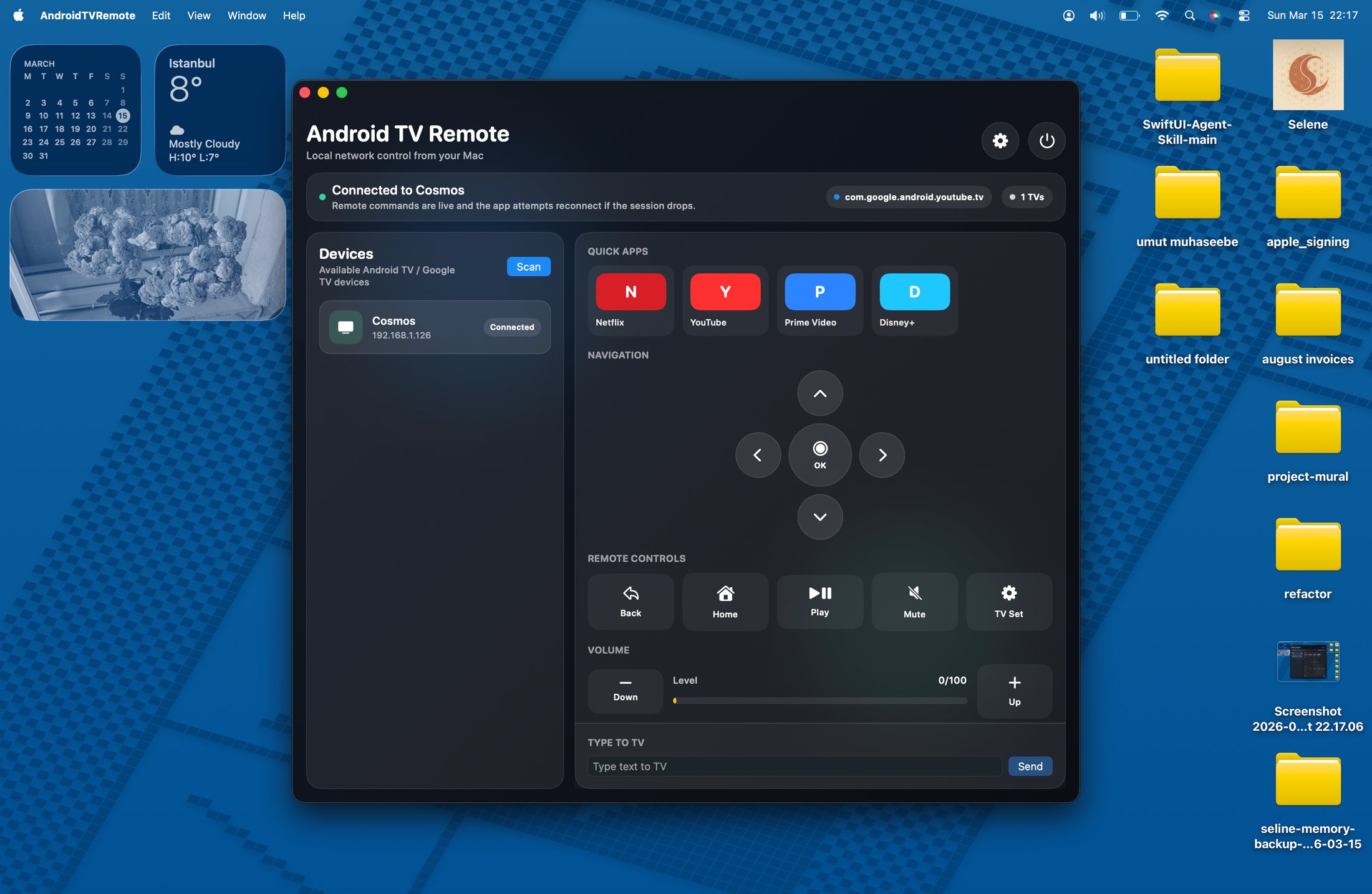
The interesting part is that Selene did not leave this as a glued-together experiment. It researched the Android TV control flow, found reference material in Python, then rewrote the implementation natively in Swift so the result could ship as an actual macOS app instead of a script in disguise.
Later, I added a SwiftUI frontend design skill from an iOS expert and ran another refinement pass focused on the interface. That cleaned up the presentation and made the remote feel much more deliberate as a desktop app.
I also added a local agent bridge so the same remote session could be controlled programmatically. That meant the project was no longer just a GUI remote for me; it also became a small local control surface agents could use directly with explicit auth and reusable session state.
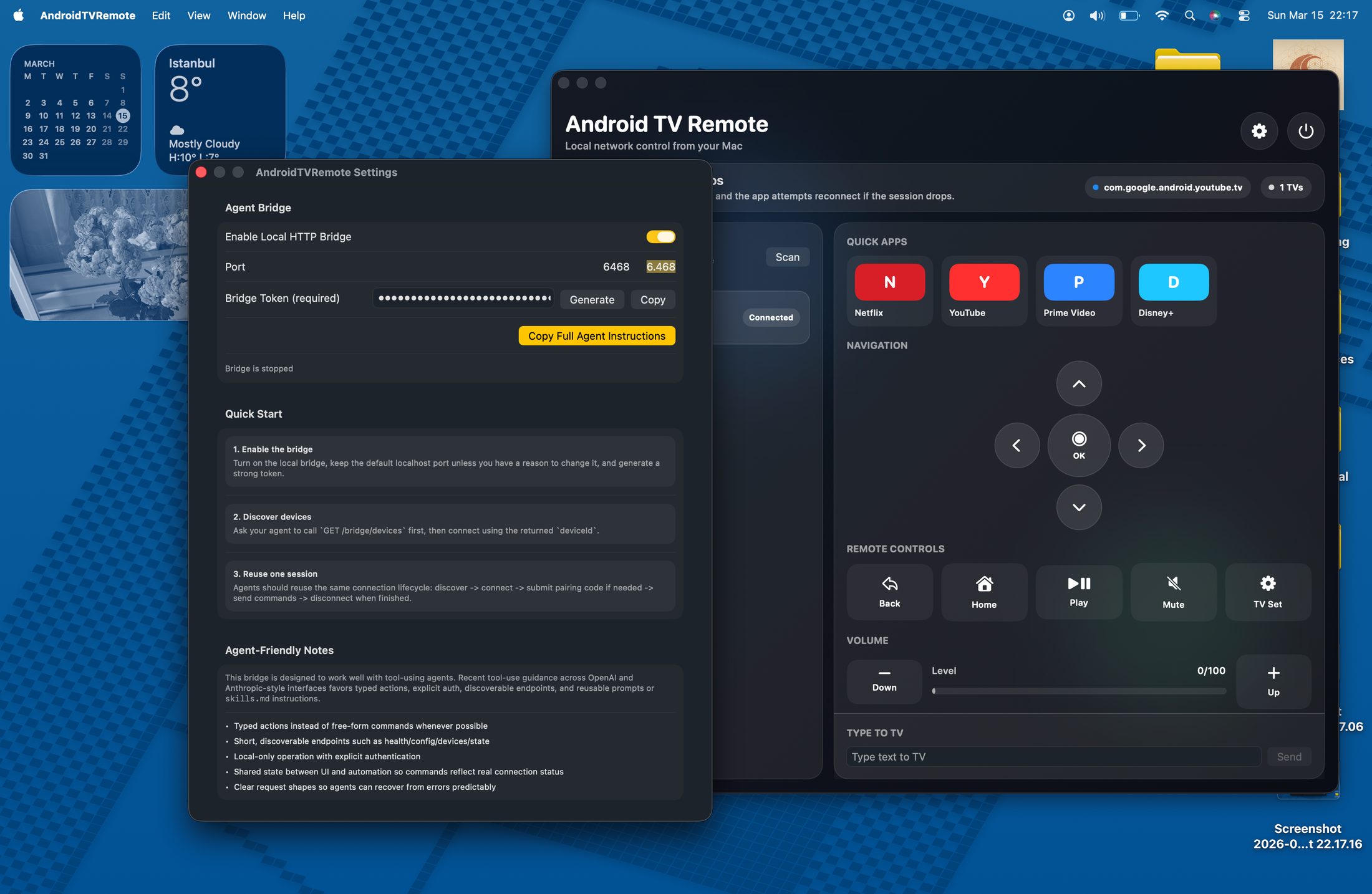
The whole first working version came together in about two hours and two prompts: one to get the app working, one to fix the connection issue. The later UI pass was a separate refinement step rather than part of the initial rescue mission.

This is still something I would keep polishing. But as a first finished project built this way, it was a useful proof point for me: take a small real-world annoyance, hand it to the agent, fix one concrete runtime issue, and end up with a native app I could actually use.